
Jump to:
| Type | Icon/Character | Description |
| NOTE
CAUTION
WARNING |  | NOTE: Information that is useful but not critical to the reader.
CAUTION: Tells the reader to proceed with caution.
WARNING: Stronger than CAUTION; means "don't do this" or that this step could be irreversible, e.g., result in permanent data loss. |
| TIP |
| Useful tips that provide additional information. |
| Procedure | 1. 2. 3. | Procedures are numbered steps to perform an action, where the order of the steps is relevant. |
| Result of procedure/action | ⇒ | Indicates the result of an action//procedure. |
| Lists | • • | Used for listings and items where the order of steps is irrelevant. |

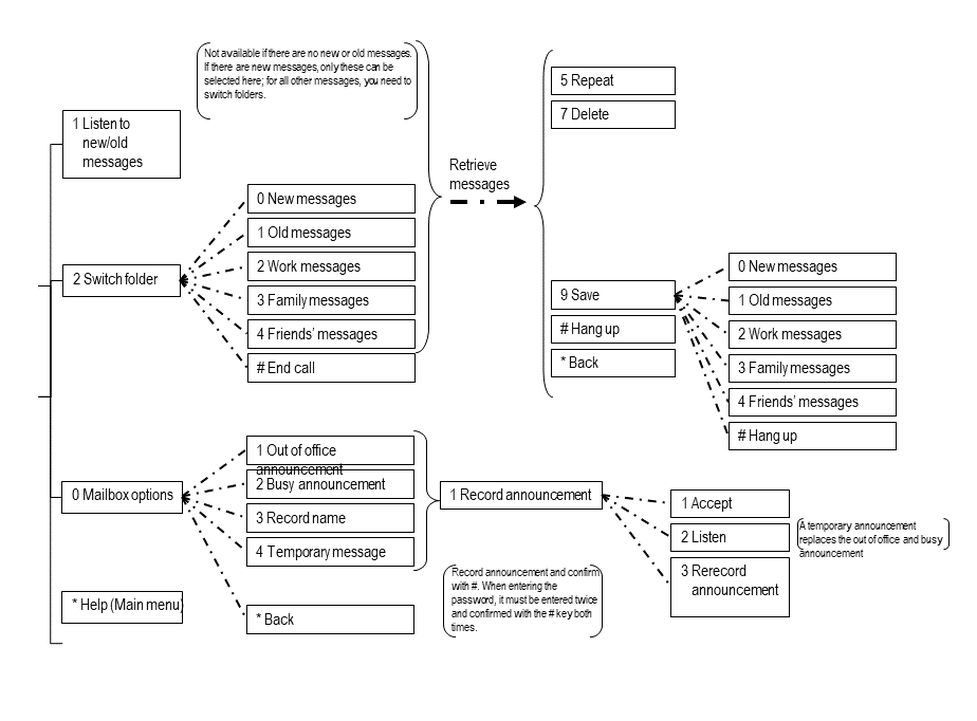
The record time for a voice mail message amounts to a max. of 180 seconds.
A maximum of 100 messages can be saved per voice mail.
When this limit is reached the user will be notified by e-mail the mailbox is full. (Requirement: an e-mail address must be specified under "voice mail")
When this limit is reached the caller will be notified: "This mailbox is full and can not accept new messages.".
Please note that voice mail messages will be saved for a period of 30 days and will then be deleted.
No content available.
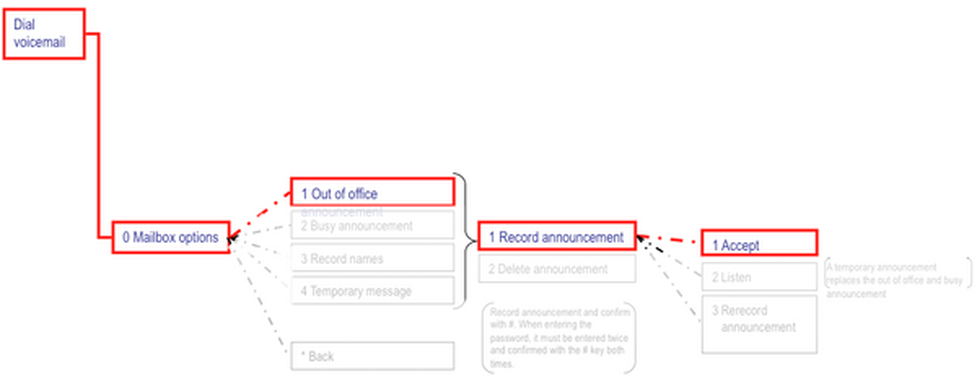
When accessing the voice mail system for the first time, you should also set up your personal voice mail:
1.Press the Retrieve key on the snom telephone or the “Voicemail” softkey on the Mitel or dial the star code *791, to access the voice mail system’s voice menu.
2.Enter your voice mail password. You can find this in the extension dialogue on the service site under voice mail.
3.Then dial “0 Mailbox Options” to set up your voice mailbox
4.Now, press “1” to record a message in the event you are unavailable.
5.Now, record your message and press “#” to end the recording.
6.Press “1” to accept the recording, “2” to replay the recording, and “3” to rerecord.
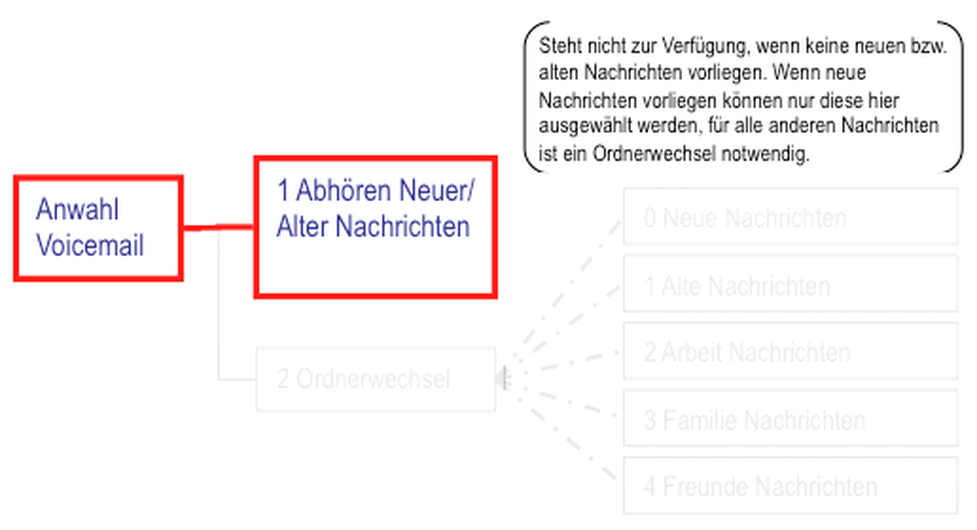
There are two options available for retrieving new or old messages:
1.When a message has been saved in the voice mail system, you can retrieve the new or old message by pressing 1 after accessing the voice mail system and entering your password.
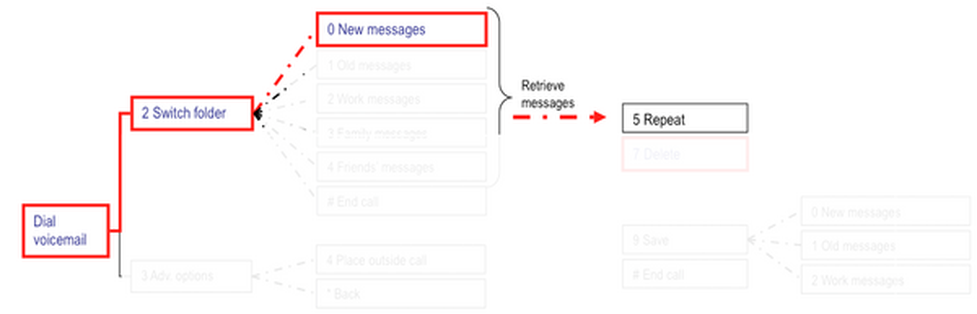
Or proceed as follows:
After accessing the voicemail system, dial 2 to switch folders.
Dial the folder you would like to switch to, e.g. 0 for “New messages” and listen to messages.
You can then dial 7 to delete the message you have just heard.
No content available.
Where can you get help?
You can use various sources for help concerning your issues. Please use them in the order suggested here:
| NFON AG | Zielstattstraße 36 81379 München Tel.: + 49 89 45 3000 www.nfon.com |
| nfon.com | At nfon.com under Service you can find an overview of all documentation, downloads, blogs and portals as well as help pages and further information. For any feedback to documentation, please contact redaktion@nfon.com |
| portal.nfon.com | The home page of the service site contains various links to manuals, brief instructions, software downloads and templates. Please read these manuals thoroughly. They help you get the most out of your telephone system. |
| support.nfon.com | The NFON AG support website contains detailed FAQs with valuable information pertaining to your telephone system. You can always check the status of your support inquiries and respond to further inquiries. |
| Support hotline for existing customers | If neither the manuals nor the FAQs or other contents of the support website provide a solution, you can open a support ticket by phone. If neither the manuals nor the FAQs or other contents of the support website provide a solution, you can open a support ticket by phone.
|
| Support hotline for test customers | Test customers are routed to a service hotline tailored to their specific needs. Our staff for this hotline is available Monday to Friday from 9 am to 5 pm at +44 20 3740 6740 for UK and +49 89 45 300 553 for Germany. Unfortunately, we are unable to provide support for test customers outside of these business hours. |
 | Support for German customers: portal.nfon.com ~ support.nfon.com ~+49 800 63 66 555 |
 | Support for customers in the UK: portal.nfon.com ~ support.nfon.com ~ Hotline +44 20 3740 6740 |
 | Support for customers in Austria: portal.nfon.com ~ support.nfon.com ~ Hotline +43 2742 7 55 66-555 |
 | Support for customers in France: portal.nfon.com ~ support.nfon.com ~ Hotline +33 01 88 45 38 00 |
 | Support for customers in Italy: portal.nfon.com ~ support.nfon.com ~ Hotline +39 02 99749 920 |
 | Support for customers in the Netherlands: portal.nfon.com ~ support.nfon.com ~ Hotline +31 88 938 2444 |