
D. Identifying a Phone
Jump to:
With two-factor phone provisioning, NFON offers the latest security standard in authentication to one of its most important services. Phone provisioning is a crucial part of the service, which is responsible for the device setup and configuration. It handles a lot of sensitive information like employees‘ name, call history, phonebook contacts, as well as everything required to make & receive phone calls. Security of this crucial part of the NFON’s service is therefore one of our highest priorities.
Standard provisioning process
With two-factor authentication in place, every new certified device added to the NFON platform is still being provisioned once connected to the internet. In order to fully setup the device and be able to make and receive phone calls, a special PIN, so called "Phone Authentication PIN" (PAP), is required. This is a 6 digit number that is unique per device ID (usually the MAC address) and can be found in the admin portal. The standard process for setting up new phones on the NFON service now requires 5 steps to complete:
Provisioning of new Devices
Add a new device and note the PAP for that MAC address *
Connect the device to the local network or restart the device if it was already connected
Wait for the device until it shows "authentication needed" on its display
Pick up the phone and for most devices you will be automatically connected to the authentication service. Otherwise please dial *89 or any other number.
When prompted, enter the PAP for this specific device, followed by the hash key (#)
Wait for the device to be authenticated and being fully operational
*A list of unauthenticated phones including the MAC address and the PAP of those phones can be exported as CSV file.
The following devices support 2-Factor-Authentification:
| Vendor | Series |
| Yealink | T19 T4G T4S T4U T5 DECT (W60B, W70B, W80B, W90B) CP Series |
| Cisco | SPA112 191 |
| Patton | SN Serie |
| Linksys | PAP 2 SPA 2102 |
Enabling for faster deployments
For convenience and to speed up deployment, the authentication via PAP is not required in the following three scenarios:
For devices for which authentication has been manually suspended in the admin portal for 30 Minutes
For devices in the network of the customer whose public IP address is on the whitelist. A successful provisioning (Yealink or Spectralink) automatically puts this IP on the whitelist for 8 hours. This period is automatically extended at each provisioning (every 4 to 6 hours).
In many, if not most rollouts of new phones, the PAP authentication will only be required once and sometimes not at all.
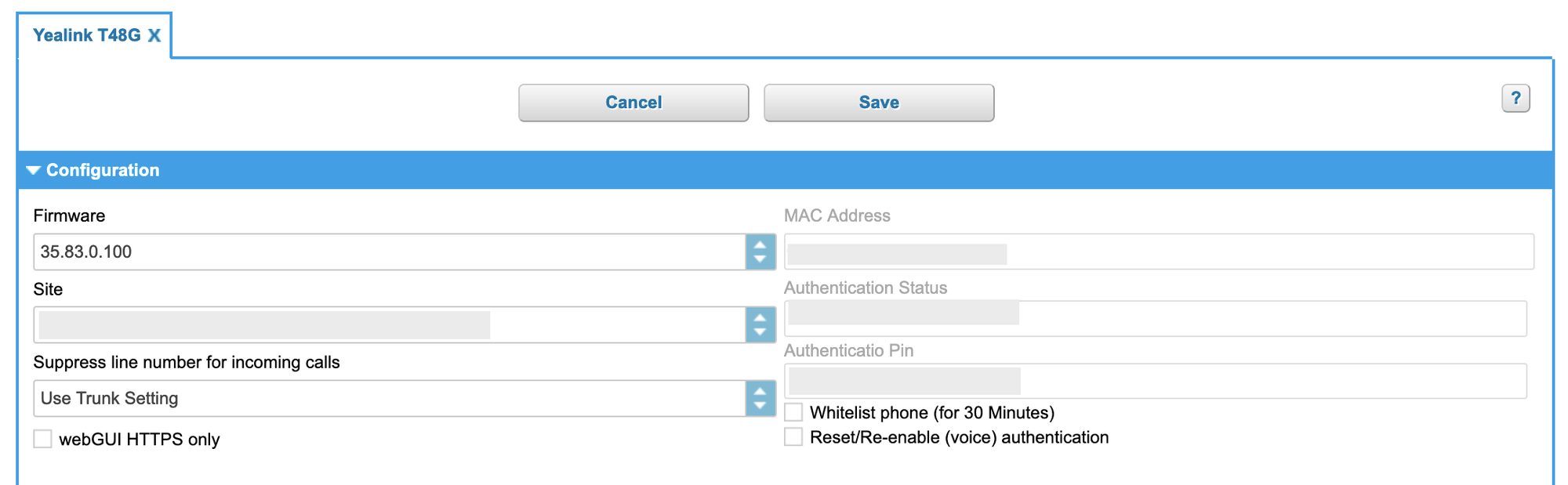
In order to authenticate the phone during its initial provisioning, a special "Phone Authentication PIN" (PAP) is required to provide two-factor authentication for the device. This PAP is obtained from the admin portal under the device settings.
Setup of phones
New devices are created in the admin portal the same way as before. Upon creation, a unique 6-digit PAP is generated. This PAP is valid until the device has been fully provisioned. Once successfully authenticated, the PAP is no longer required.
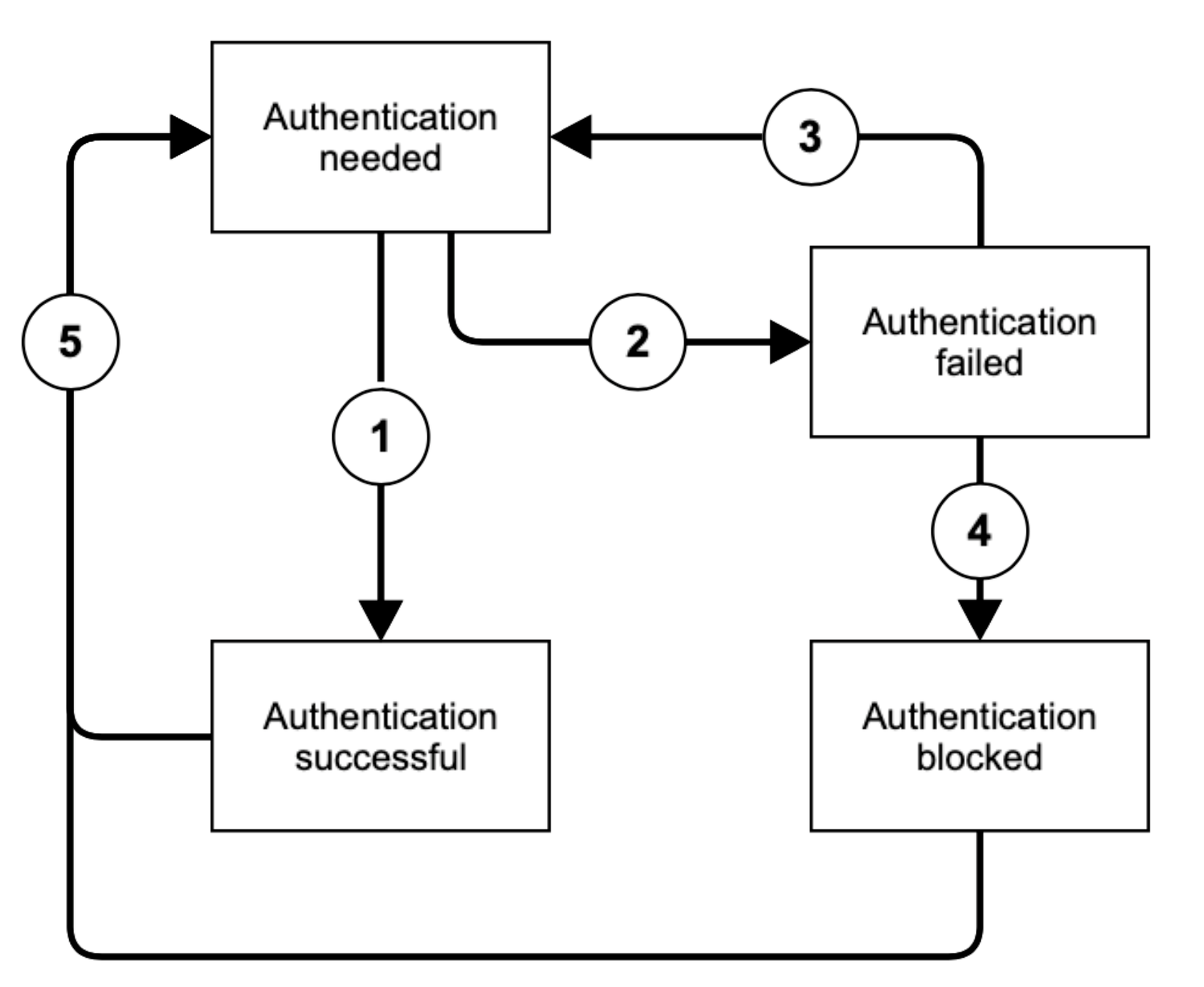
During the this whole process, the device can be in either of the following three authentication states:
| State | Description |
| Authentication needed | The phone has been set up but has not yet successfully authenticated |
| Authentication failed | The phone is temporarily blocked from authentication and will not accept any PAP |
| Authentication blocked | The phone is permanently blocked form authentication and will not accept any PAP |
| Authentication successful | The phone has been successfully authenticated and fully provisioned |
When a new device has been added into the admin portal, its state is initially "authentication needed". In that state, authentication via PAP is required if the phones public IP address has not been added to the whitelist. Upon successful authentication, the state transitions to "authentication successful" (1). Once successfully authenticated, the PAP is no longer required. In case the authentication failed three times in a row, the state traditions automatically form "authentication needed" to "authentication failed" (2). The state will automatically transition back to "authentication needed" after 30 minutes (3). Upon multiple unsuccessful authentication attempts, the state transitions to "authentication blocked" (4) which permanently blocks this phone from additional authentication attempts. In either of these states, the state can manually be reset back to "authentication needed" (5) by resetting the PAP. Therefore, the admin portal provides two actions, which are available in any state:
| Action | Description |
| Suspend Authentication | Explicitly disable any authentication requirements for the particular device for 30 minutes. |
| Reset Authentication | Invalidated the current authentication and immediately generates a new PAP. |
If the device loses its configuration or has been reset to factory defaults, the reset authentication action must be executed in order to generate a new PAP and authenticate the device again.
IP Whitelisting
Permanent whitelisting
For devices that are to be operated from a location that uses a static public IP address, it is possible to whitelist the public IP (as trusted) in the admin portal. The NFON platform will then no longer require authentication using the PAP for all provisioning requests coming from that IP address. The whitelist accepts either single IPv4 addresses (xxx.xxx.xxx.xxx) or IP Ranges in CIDR notation (xxx.xxx.xxx.xxx./yyy). It can be configured in the admin portal “Administration” > “Profile” > "Technical Details".

Temporary whitelisting
Upon successful authentication of a device using the PAP, the NFON platform will automatically add the public IP address of the network it received the provisioning request from to a temporary whitelist. The IP address will remain whitelisted for a period of 8 hours from this moment. If new or existing devices are successfully provisioned during this period, the period is extended continuously for a further 8 hours. This mechanism is meant to simplify the provisioning process for new customers or sites, or for when a static IP address is not available or yet known.
CSV Export
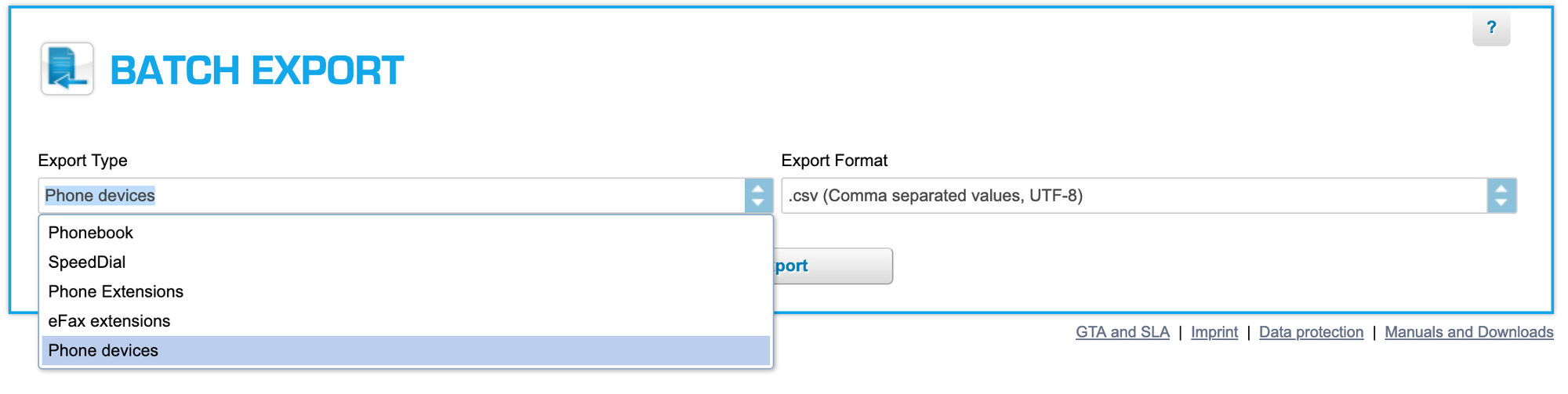
It is possible to export a list of all devices from the admin portal, as a CSV file. This file contains the vendor, type, MAC address, creation date, site as well as the authentication state. In case the device is not yet successfully authenticated, the file also contains the PAP for that device. This is done in the admin portal "Administration" > "Batch Import/Export"
Every certified device added to the NFON platform will be provisioned once it has been connected to the internet. But without a valid authentication, the device willl be unable to make or receive phone calls, except for emergency numbers and the authentication service.
This applies to selected certified devices connected to the NFON Platform, unless:
The device has already completed two-factor authentication using PAP has not been reset to factory default settings, or has not lost its configuration;
The authentication was manually suspended for 30 minutes via the administration portal;
Another device was successfully authenticated using PAP from the same public IP address in the last 8 hours;
The public IP address of the network has previously been set up as whitelisted on the administration portal
Authentication Mode
Once the certified device is connected to the network and powered up, it will only receive minimal configuration from the NFON provisioning service. A visual indication stating "authentication needed" will be shown on the device display. In this state, only calls to emergency numbers and the authentication service will be possible. In order to fully authenticate the device, users will need to dial *89, which will initiate a call to the authentication service. A voice prompt will guide the user through the process and request them to enter the PAP, followed by the hash key (#). Calls to any other destination (internal or external, except for emergency numbers) will be intercepted and redirected to the authentication service. Where supported by the device, simply picking up the handset will automatically initiate the call to the authentication service.
As soon as the device has been successfully authenticated using the PAP, the call will be terminated and the device will receive its full configuration from the NFON provisioning service. Note that it will take take a short period of time for the device to reconfigure itself and be fully operational.
Failed Authentication
In the event that an incorrect PAP was provided by the user three times in a row for a specific device, the system will prohibit further authentication attempts from that device for period of 30 minutes. A visual indication stating "authentication failed" will be shown on the device display. Dialing *89 or any other number, with the exception of emergency numbers, will be intercepted and an announcement informing the user that the authentication of this device is not currently possible will be played. After the 30 minutes period has elapsed, the device display will automatically update to show the "authentication needed" message and further authentication attempts can be made. Alternatively, the device can be switched back to "authentication mode" manually via the administration portal.
In this state, authentication of other devices on the same network (from the same public IP address) will still be possible. Upon successful authentication of another device on this network, the public IP address will be whitelisted for a period of 8 hours. Restarting devices that have not yet completed authentication, including these into a “failed authentication" state, will allow the full provisioning of these devices.
In order to provide a user with the correct PAP, one will need to know the MAC address of a particular device. On most phones, the MAC Address can be found via the device own on-screen menu (in the same menu than the IP address). Where available, this can quickly be accessed via a softkey while the device is in an "authentication needed” state. On devices where such an option is not available, or devices that don’t have a screen at all, the MAC address can usually be found on a label on the phone itself. The label is often located at the back of, or underneath, the device and will be printed below a barcode. The MAC address is a sequence of 12 hexadecimal digits (numbers and letters), sometimes split into 6 groups of 2 characters, separated by a dash or a colon. For instance:
1a2b3c4d5e6f
1a:2b:3c:4d:5e:6f
1A-2B-3C-4D-5E-6F
| Manufacturer | Link to the manual where available | Examples where to find the MAC address on the device |
| Yealink | Yealink T19P E2, T41P, T42G, T46G, T48G, T41S, T42S, T46S, T48S, T52S, T54S, T53, T53W, T54W, T57W manual |  |
| snom | snom D305, D315, D345, D375, D385 manual |  |
| Poly |  | |
| Panasonic |  | |
| Gigaset |  | |
| Patton |  | |
| SPA112 |  |
In the event that the phone configuration is wiped, or the phone is reset to factory defaults, the device will loses some authentication information that is required for the NFON platform to fully confirm its identity. In this case, a new PAP must be generated and used to authenticate the device again. Generating a new PAP can be done in the device settings using the administration portal.
Should a device have been deleted & re-created in the administration portal, or should the PAP have been reset unintentionally, the phone authentication information, which is required for the NFON platform to fully confirm its identity, will no longer match the information stored in the administration portal. In this instance, the phone will need to be reset to factory defaults and then authenticated using the new PAP.
Documentation how to make a factory default reset (FDR) is available for most vendors: